
Customer agreements
Use your own customer terms, with a record of the exact agreement
Prepare customer-specific agreements from your approved clauses and reusable templates, preserving the exact wording that was issued.
At a glance
How it works
- Choose your approved wording
Start from a template and select the clauses for this customer.
- Review the agreement
Check the issuer, customer, effective date and optional shipment scope.
- Invite the customer to sign
Send the reviewed copy and retain the completed agreement with its history.
Preparing a draft does not email the customer. Requiring acceptance before dispatch is a separate, optional choice.
Read the detailed guide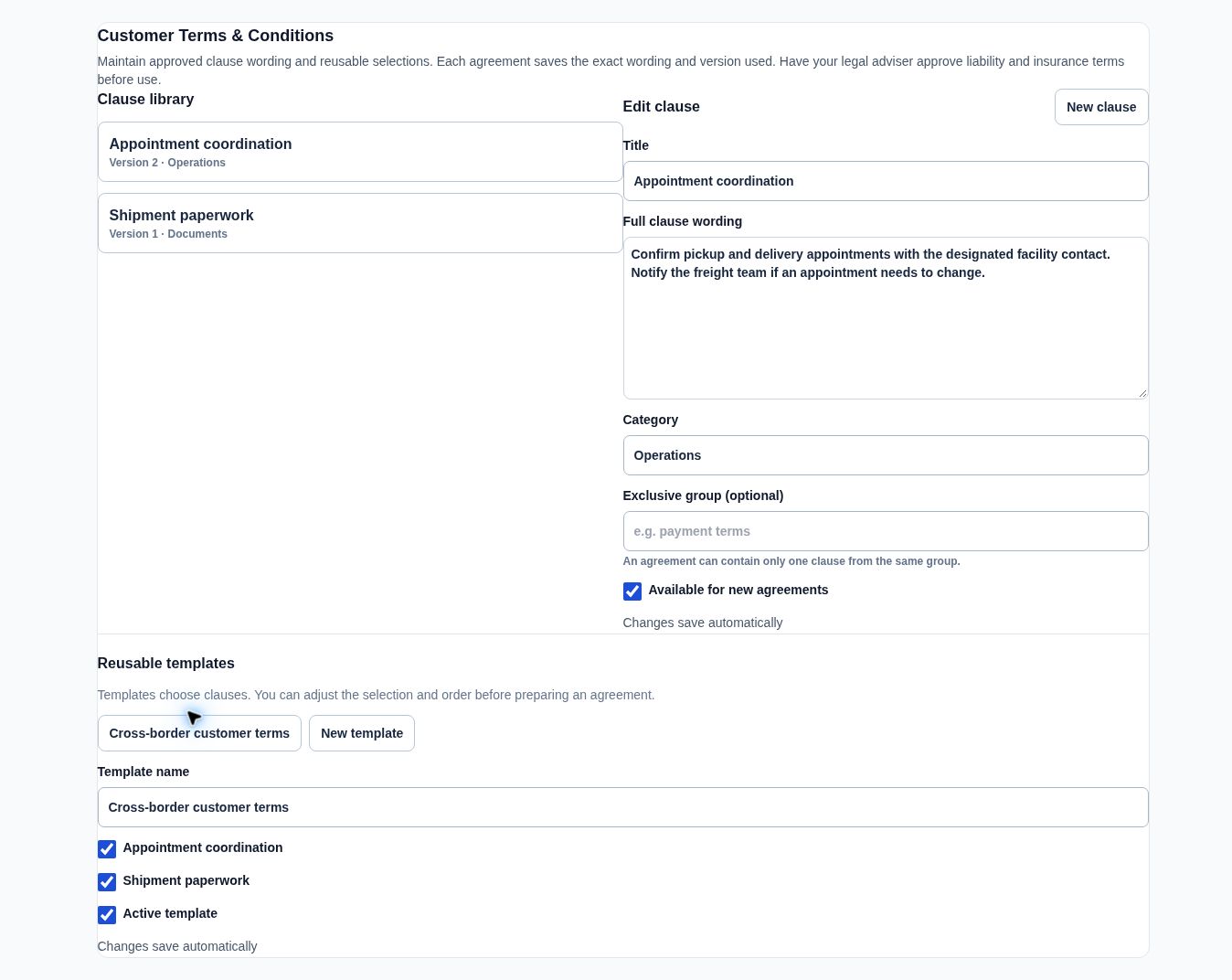 Enlarge screenshot
Maintain your approved clause wording
In Settings → Customer Terms, finance and administrators maintain the clause library. A clause has a title, wording, category and version. Reusable templates hold a selection of clauses so staff can prepare a familiar set of terms without rebuilding it each time.
The agreement content comes from your company’s approved wording. Editing a clause for future use does not rewrite terms already issued. Inactive clauses remain part of historical records; staff must acknowledge their omission when preparing from an affected template or revision.
Prepare the agreement for the right customer and issuer
Open Customers → Agreements & Documents to start an agreement. Choose the contact, issuing company, effective date and clauses, using a template where helpful. An agreement can apply to the customer relationship or be scoped to a particular shipment.
On the fictional FS-2048 move, the freight team might select its approved cross-border terms and specify Demo Brokerage as issuer. For represented freight, review the appropriate issuer and scope before preparing the copy.
Review the exact copy before inviting the signer
Preparing creates a fixed draft for review. Check the wording, recipient, company, scope and review PDF, then explicitly send the invitation. Preparing a draft alone does not email the customer.
If the terms need to change, create a revision. Issuing a newer revision replaces older unfinished invitations while preserving completed agreements. The revision retains the issuer and scope, making it clear which business relationship the new terms cover.
Optionally require acceptance before dispatch
A prepared agreement can be marked as required before dispatch. After issue and from its effective date, that requirement applies to the matching customer, issuing company and optional shipment. The app checks acceptance at the relevant dispatch transitions.
Finance or administrators can record a reason for a shipment-specific override when necessary. A new required revision needs a fresh review. Teams can also use agreements without enabling a dispatch requirement.
Keep the signed terms available to both teams
The customer reviews the invitation, verifies access to the designated email address, initials and acknowledges each clause, and completes the electronic-signature step. The separate signing guide shows that experience.
The completed PDF is retained under the customer and is available through the linked customer portal, including for a customer with no shipments. Confirmation delivery provides the completed copy by email. Staff can review progress, reminders and delivery history from the agreement record.
Common questions
Can each customer have a different set of terms?
Yes. Staff select the clauses for the customer agreement and can start from a reusable template.
Will updating a template alter an agreement already signed?
No. Issued agreements preserve their selected clause wording and versions. New wording is handled through a new agreement or revision.
Does this describe signing any uploaded PDF?
The customer-agreement workflow builds a document from your clauses and selected terms. Carrier rate-confirmation acceptance is a separate supported signing workflow; a general uploaded-PDF signing tool is not described here.