
Two business models
Run your own brokerage and agency freight in one workspace
Standard and Agency representation are native shipment choices in the same workspace, with the appropriate references, documents and financial workflows.
At a glance
How it works
- Identify whose load it is
Use Standard for your own brokerage or Agency for a represented partner.
- Keep the right reference
Use your configured load number or the reference supplied by the partner’s TMS.
- Review documents and amounts
Check the issuer, freight charges, costs and applicable agency compensation.
The partner portal is optional and read-only. Recording a partner’s load number does not synchronize its TMS.
Read the detailed guide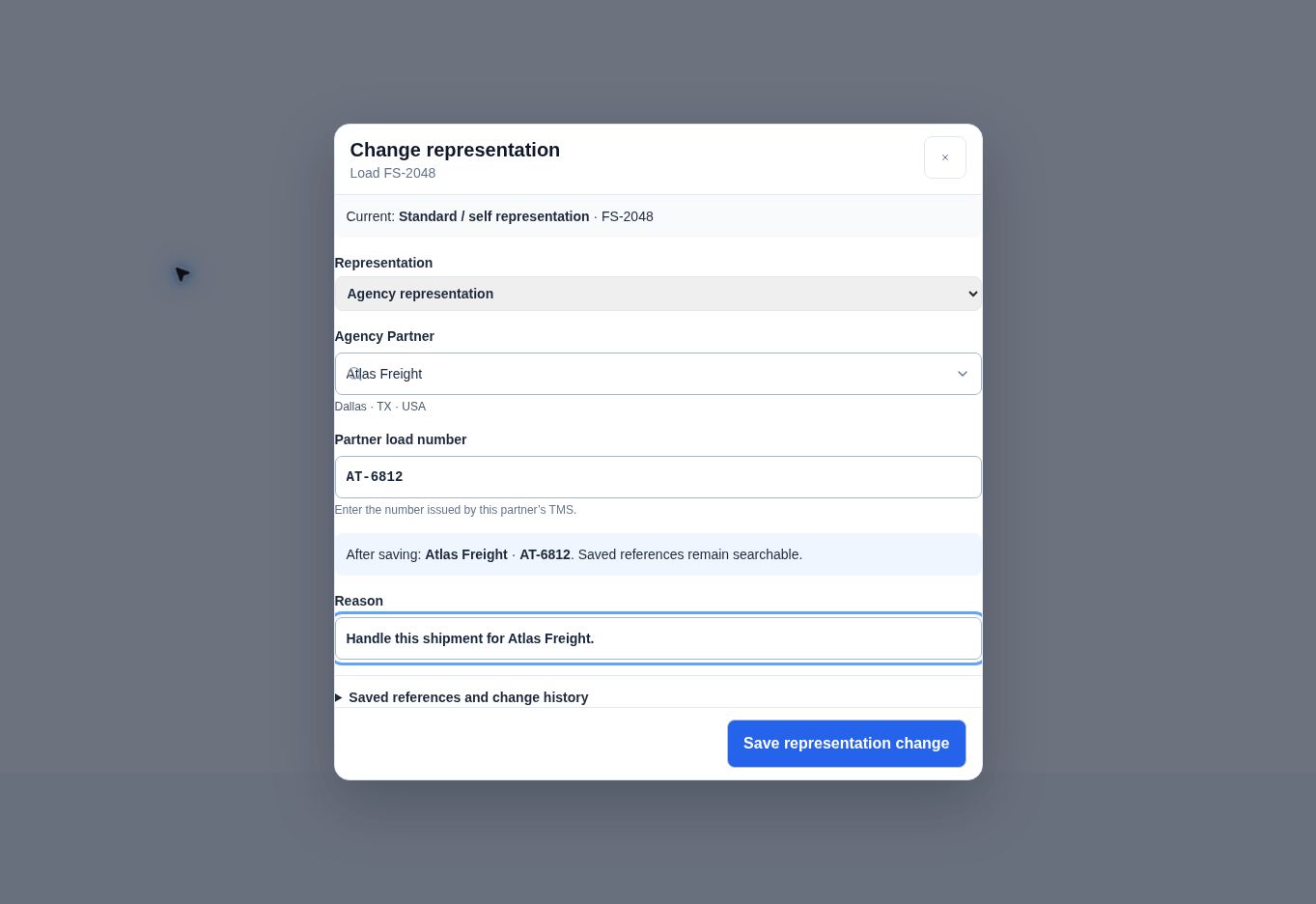 Enlarge screenshot
Choose how each shipment is represented
Standard / self representation is the workflow for freight handled by your own brokerage. Agency representation identifies the partner company you represent on that shipment. Both kinds of work can be managed by the same staff in the same company workspace.
For example, Demo Brokerage handles FS-2048 for its own account and another shipment for Atlas Freight, a fictional agency partner. The route, carrier assignments, updates and paperwork still belong to each shipment; the representation tells staff whose business the load is.
Keep the right load number and document issuer
Standard loads use your configured numbering workflow. Agency loads use the reference supplied by the partner’s TMS. The active business reference appears in the applicable screens, notifications and newly prepared documents.
Represented-company details support the appropriate issuer on operational documents, including vendor purchase orders. Staff should review the company identity and reference before issuing a document. Earlier issued or sent copies retain their original identity and history.
Review freight amounts and agency compensation
For Standard shipments, staff review customer freight charges alongside carrier and vendor costs and prepare the customer invoice. Agency work also keeps the shipment’s revenue and costs visible for operational and financial review.
Agency commission calculations use the configured partner terms, including supported linehaul and margin percentages. The Agency invoice workflow produces a commission statement for the represented partner. Review the partner’s terms and the shipment figures before finalizing the document.
Give the partner’s back office a controlled view
An administrator can enable the Agency Partner Portal and invite individual contacts. Partner users can search and filter the shipments currently represented by that partner, inspect shipment details and view customer freight charges and carrier or vendor costs.
Staff explicitly choose which documents to share with the partner. Customer sharing is independent. The partner portal is read-only and excludes internal tasks, conversations, staff notes and commission calculations. An issued commission document can be shared deliberately when appropriate.
Handle a change in representation with a recorded review
Authorized staff can change representation through a dedicated dialog with the target company, load reference and reason. The shipment retains its reference history, allowing staff to trace earlier Standard and Agency numbers.
Financial and document checks can block the change until outstanding items are resolved. Completed loads must be reopened; finalized invoices and recorded settlements need resolution; current issued POs must be cancelled and reissued under the new representation. Sent documents require review and remain archived. This is a controlled business change, not simply a label edit.
Common questions
Do I need separate workspaces for brokerage and agency loads?
Both representations can be used within one operating company workspace. The choice is recorded per shipment.
Does FreightScale synchronize the partner’s TMS?
This workflow stores the partner and its load reference. It does not by itself provide an integration or synchronization with the partner’s software.
Can the partner edit my loads or see internal conversations?
The Agency Partner Portal is read-only. Its permitted shipment information and explicitly shared files exclude internal tasks, notes and conversations.