
Connected assistance
Ask about your freight. Review what goes out.
An authorized staff member can connect ChatGPT to FreightScale to find shipment information and perform permitted tasks. The connection follows that employee’s company and role, with separate controls for additional capabilities.
Start with a specific shipment question
Use the connection to find a shipment, inspect its details and ask a focused question. For example: “Find FS-2048 and summarize the latest reported location, delivery estimate and open tasks.” The answer depends on the information actually saved in FreightScale.
Other useful prompts include “Which active shipments are waiting for a POD?” and “Show the carrier and pickup details for FS-2048.” Treat a summary as a way to navigate the record, and check the source details when making an operational decision.
Choose the capabilities for each employee
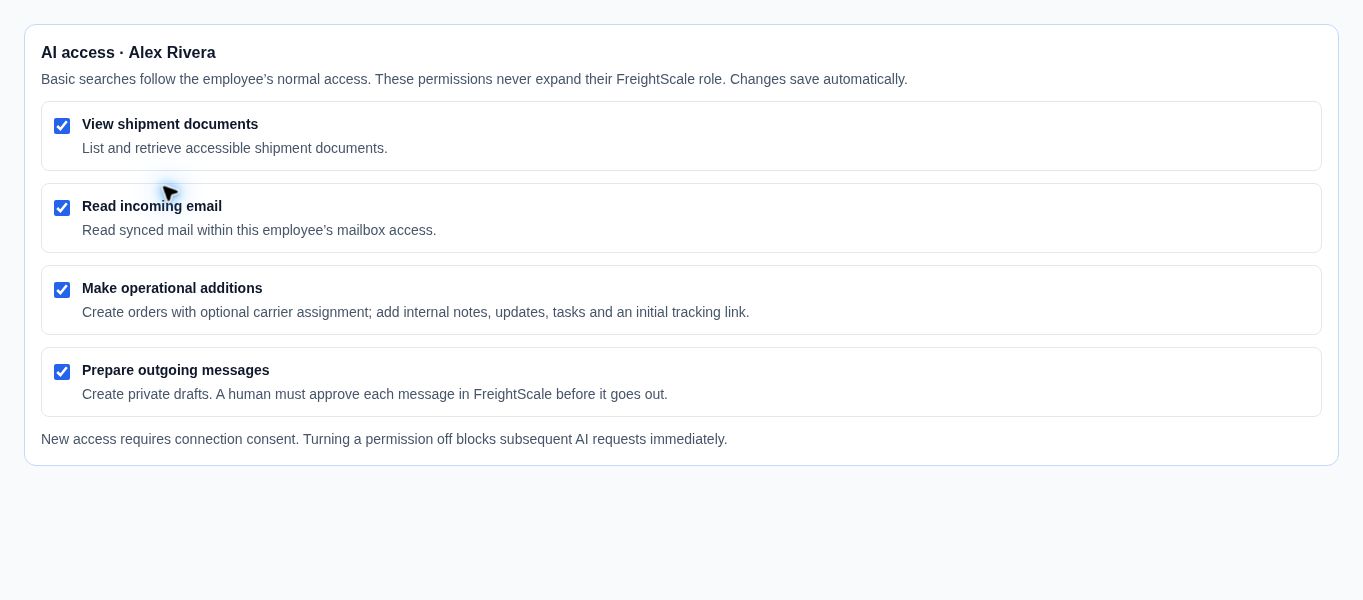
Basic searches follow the employee’s normal access. Additional permissions cover viewing shipment documents, reading synced incoming mail, making operational additions and preparing outgoing messages. Reading mail also depends on the employee’s mailbox access.
Each person connects independently and consents to the requested access. Turning off a permission blocks subsequent requests for that capability. The permissions do not expand the employee’s FreightScale role or give access to another company’s records.
 Enlarge screenshot
Use controlled additions to reduce repeated entry
When enabled, supported actions can create an order, add an internal note, tracking update or task, and add an initial tracking link. The order workflow provides a preview before creation and can use an existing active carrier as part of that new order.
For example: “Preview an order from these shipment details, then show me the fields to check.” Verify the customer, facilities, dates, cargo and carrier before proceeding. These tools do not provide general record deletion, financial editing or unrestricted changes to existing assignments.
Keep outgoing communication under human review
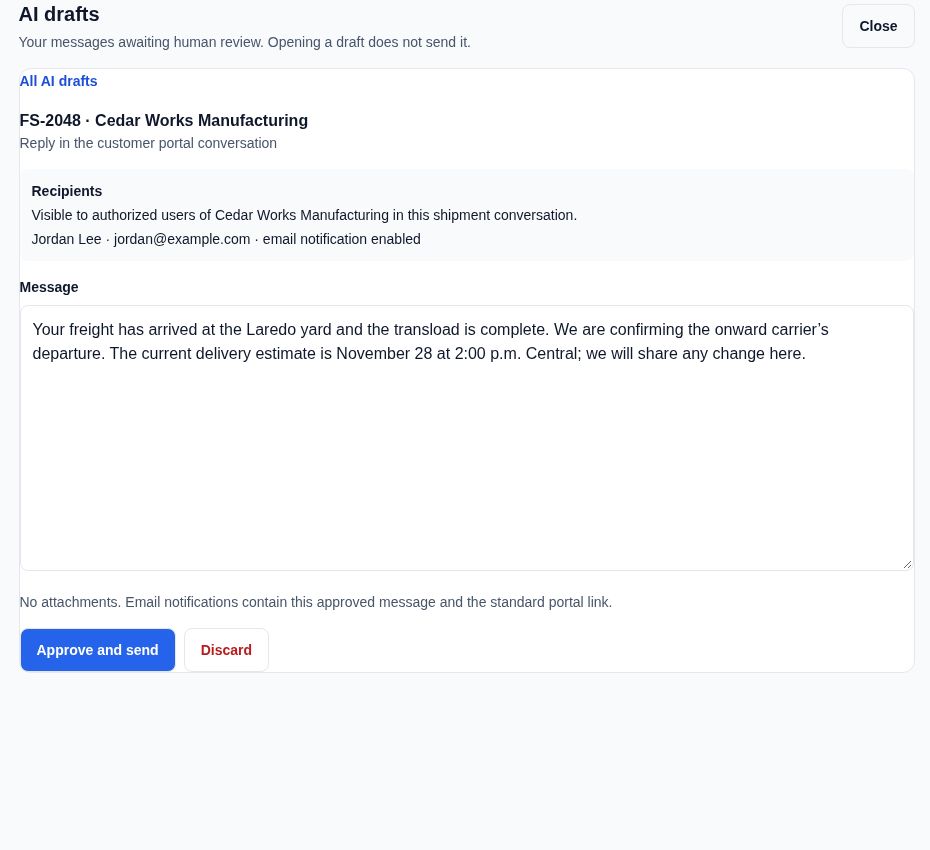
When message preparation is enabled, ChatGPT can create a private draft for a supported customer or carrier conversation, or a carrier update request. Open Inbox → AI drafts in FreightScale to inspect the recipient, shipment and exact message.
Edit the wording if needed, save the revision and approve that version when it is ready. The connector cannot approve or send its own draft. Approved portal messages use the existing conversation and notification workflow; approved carrier requests use the existing update-request email workflow.
 Enlarge screenshot
Know what connecting does—and does not—set up
This is an individual staff connection, not a customer or carrier portal login. The FreightScale endpoint is https://tms.merktx.com/api/mcp. Connection options depend on the ChatGPT account and workspace settings; an administrator may need to enable the appropriate connector capability.
Connecting does not start continuous monitoring or make ChatGPT an unattended dispatcher. Ask for the work you want done, grant only the capabilities needed and review outgoing drafts inside FreightScale.
Common questions
Can ChatGPT send messages without staff review?
The current connector prepares private outgoing drafts. A person must review and approve the message inside FreightScale before it is released.
Can it delete records or edit financials?
Those actions are outside the supported connector workflow. Operational additions are separately permissioned, and they do not create unrestricted editing access.
Are the prompts shown here real customer conversations?
No. The prompts are illustrative examples. Screenshots show the actual FreightScale access and review interfaces with fictional demonstration data.